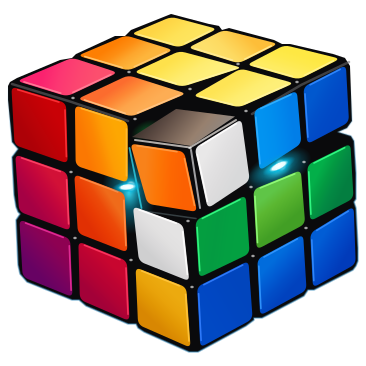
Fix my cube
Where is the problem?
What do you see?
One corner is twisted
- Hold the twisted corner on top and turn the top layer 45 degrees, so the corner sticks out.
- Grip the corner and twist it on the spot a third of a turn, the way that brings each color back to its own side.
- Turn the top layer back. The corner's three colors now match the three centers around it.
Turns never twist one corner on its own, so no moves fix this: a knock or a hand twisted it.
One edge is flipped
- Hold the flipped edge on top, at the front, and turn the top layer 45 degrees.
- Lift the edge out with a fingertip under it, gently. Lever at an edge, never at a corner.
- Turn it over, press it back in and turn the top layer back.
Turns only ever flip an even number of edges, so no moves fix one flipped edge: it went back in the wrong way round.
Two pieces are swapped
- Hold one swapped piece on top and turn the top layer 45 degrees. Lift the piece out, gently; for a corner, lift out an edge beside it first.
- Take out the other piece the same way.
- Put each piece in the other's place, colors matching their centers, then press back any edge you lifted.
Turns never swap just two pieces, so no moves fix this: the cube was put back together wrong. Take pieces out only when everything else is solved: in the middle of a solve, two corners often look swapped on a healthy cube, and swapping them by hand would break it.
It came apart
- More than one piece out? Build it solved, not as it was: put back at random, a cube can be solved only one time in twelve. To take the rest apart, turn the top layer 45 degrees and lift out an edge, gently.
- Hold the centers with white down and press in the bottom layer's pieces, colors matching their centers. Then the four middle edges, the same way.
- Then the top layer. Turn it 45 degrees to press in the last edge, gently. Never force a piece.
Only one piece fell out? Press it back in and keep going; if the last layer then shows one edge flipped or one corner twisted, fix it as above.
What does the solver say?
More than nine stickers of this color
There are now more than nine WHITE stickers. Check the marked ones.
The solver may also say:
10 WHITE stickers, 8 YELLOW.
A YELLOW sticker on the RED side was probably read as WHITE.
A YELLOW sticker on the RED side was probably entered as WHITE.
- Start with the side the solver names and compare it with your cube, sticker by sticker.
- Change the wrong sticker to the color your cube shows.
- Still off? Check the other sides the same way, in bright light without glare, then solve again.
A cube has nine stickers of each color, so one wrong sticker leaves one color over and another short.
The wrong side was probably facing the camera.
The middle sticker should be RED. Make sure the RED side faces the camera, or retake it.
The solver may also say:
The middle sticker of the RED side is not RED.
- Find the side the solver names: its middle sticker should be that color.
- Turn the cube so that side faces the camera, not a side next to it.
- Scan that side again, then solve.
Middle stickers never move, so each side is known by its middle color; another color there means another side was scanned.
One sticker was probably read wrong.
One sticker was probably entered wrong.
The solver may also say:
One corner has a color combination that doesn't exist on a real cube.
One edge has a color combination that doesn't exist on a real cube.
The cube colors don't form a valid cube. Review the highlighted face colors or rescan the cube.
- Compare each side on screen with your cube, sticker by sticker, in bright light.
- Check red against orange and white against yellow first: they are the easiest to mix up.
- Correct the wrong sticker, then solve again.
Each piece of a real cube has fixed colors, so one wrong sticker makes a piece that cannot exist.
A corner is twisted in a way that isn't physically possible.
- Compare each side on screen with your cube, sticker by sticker: one wrong sticker also gives this message.
- If every sticker matches, a corner of your cube really is twisted: fix it by hand.
- Then scan the cube again and solve.
No turns twist one corner on its own, so either a sticker is wrong or the corner was twisted by hand.
An edge is flipped in a way that isn't physically possible.
- Compare each side on screen with your cube, sticker by sticker: one wrong sticker also gives this message.
- If every sticker matches, an edge of your cube really is flipped: fix it by hand.
- Then scan the cube again and solve.
No turns flip one edge on its own, so either a sticker is wrong or the edge went back in the wrong way round.
Two pieces are swapped in a way that isn't physically possible.
- Compare each side on screen with your cube, sticker by sticker: one wrong sticker also gives this message.
- If every sticker matches, two pieces of your cube really are swapped: fix them by hand.
- Then scan the cube again and solve.
No turns swap just two pieces, so either a sticker is wrong or the cube was put back together wrong.
The face was not clear enough to read. Use brighter light, center all 9 stickers in the guide, then capture again.
This side was hard to read. Check each sticker against your cube, then continue.
- Use bright, even light: no shadow on the cube and no glare on the stickers.
- Hold the side square to the camera with all nine stickers inside the guide, then capture again.
- When the solver asks you to check a side, correct any sticker that differs from your cube, then continue.
The camera tells colors apart by light, so shadow and glare leave it unsure.
The solver could not find a solution in time. Double-check the colors on each face, then try again.
The solver may also say:
Capture all 6 faces before confirming the cube.
We couldn't apply that cube state. Review the colors, then try again.
Cube input could not be confirmed.
Cube input is not available right now.
The cube data is incomplete; some stickers are missing or unreadable.
- Make sure all six sides are in: scan or enter any side that is missing.
- Compare every side with your cube and correct any sticker that differs.
- Try again. If the same message comes back, reload the page and enter the cube again.
The solver needs all 54 stickers, each as your cube shows it, before it can solve.